05 Nov 2025

How We Built the Functional tester UI for Wynxx


Polish .NET Team in Action: How We Built the Functional Tester UI for Wynxx
Bartosz_Fijalkowski_Square.png
Bartosz Fijałkowski
blogAbstractMinutes
blogAbstractTimeReading
gft-image-brand-architecture-02.jpg
Asset Management
AI
Business Trends
GenAI
contact
share
In recent months, our Polish .NET team - Michał Kłos , Rafał Kaczka , Piotr Wachowski, and myself - has added a brand-new feature to our core product, #Wynxx. By mid-December, it will officially go live and become a fully integrated part of the system. It is called Functional Tester UI.

Where the Idea Came From?

The idea for the Functional Tester UI emerged directly from our customer conversations. There was a time when I was presenting Wynxx to different banks several times a week, and the same types of questions kept coming up:

  • “Can Wynxx help with application automated testing?”
  • “Can we generate automated tests from our manual test cases?”
  • “Does the tool support UI testing?”

At that moment, the answer was: not yet. But these questions made something clear - the market was missing a solution that could translate a manual test (a scenario executed step-by-step by a person) into a fully automated test that can be executed by a machine.

And the difference is huge: three minutes of clicking by a human versus three seconds of execution by a machine.
From Idea to Implementation

Our team quickly agreed: if this feature isn’t on the roadmap yet - let’s build it ourselves. After securing a small budget, we got to work. A Polish .NET development squad was formed, collaborating closely with our Brazilian colleagues to build a new version of the functional tester.

Two months later, we had a working prototype - Functional Tester UI 1.0.


How It Works?

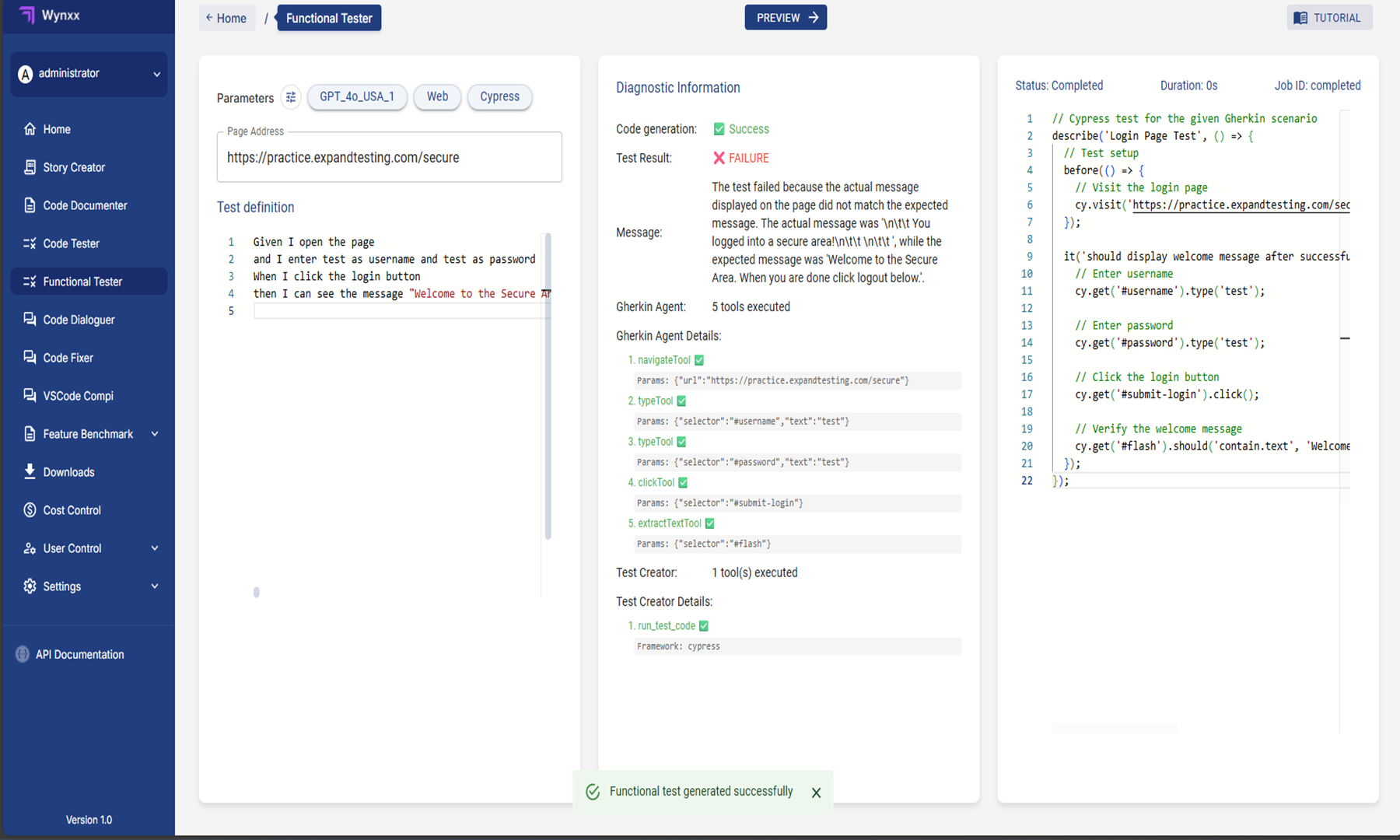
The screenshot below captures a moment straight from our Functional Tester UI — the place where all the magic happens.

On the left side, you can see the test scenario written in plain English, using the familiar Gherkin format: simple steps that describe what a tester would normally do manually - open a page, enter credentials, click a button, and check the result.

In the middle panel, the system shows the diagnostic view - a kind of behind-the-scenes look at how the AI agent interprets and executes each instruction. Here, you can trace every action the tool performed and even see why a particular test passed or failed.

Finally, on the right, there’s the automatically generated Cypress code - ready to be copied, integrated, or run. It’s a direct, working translation of the natural-language scenario into executable test code.

In this example, the test was generated successfully, but it failed during execution because the message on the page didn’t exactly match the expected text. Still, that’s the beauty of it — the tester can instantly see what went wrong, adjust the scenario, and rerun it within seconds

pl-blog-Wynxx image.png

Figure: The Functional Tester UI in Wynxx - where natural-language scenarios are instantly transformed into executable Cypress test code, with real-time diagnostics guiding every step.

The Functional Tester UI is more than just another product feature. It’s proof that local engineering teams can drive global innovation - from an idea born in client meetings, through hands-on development, all the way to a production-ready solution used by customers worldwide.

Bartosz Fijałkowski
Head of .NET Development Poland , w GFT Technologies Poland

A Few Buzzwords (and What’s Behind Them)

Under the hood, the Functional Tester UI is a fully flagged agent solution, integrated with the MCP server and capable of running autonomously end-to-end tests.

Sounds fancy - and it is.

During test generation, we use a LangChain's toolkit managed by an AI agent.

For example: When the scenario says, “Fill in the login field with credentials,” the agent decides whether to use the tool that inputs text or the one that validates it.

There’s no need for manual configuration - the AI handles it automatically, matching actions to the right tools in Playwright or Cypress, while controlling the browser in real time.

We also implemented integration with the MCP Playwright server, which allows us to fetch the content of a webpage, run generated tests to verify correctness, and even use MCP to regenerate parts of the code when needed.

Why It Matters

Thanks to this solution, Wynxx not only better addresses customer needs but also sets a new direction for UI test automation. What’s more - we are one of the first teams to successfully use AI agents and the MCP server in a real-world commercial project. 

And yes - that’s definitely something to brag about. 

In Summary

The Functional Tester UI is more than just another product feature. It’s proof that local engineering teams can drive global innovation - from an idea born in client meetings, through hands-on development, all the way to a production-ready solution used by customers worldwide.

Ask Our ExpertBartosz Fijałkowski

Bartosz_Fijalkowski_Square.png
message
dataProtectionDeclaration